

Yandex Navigator 21.5 for Android

- Description
- What's new
Yandex Navigator is made for drivers who want to get from A to B with less friction and fewer nasty surprises. The app includes live traffic, automatic rerouting, voice guidance, speed camera alerts, offline maps, road warnings, and voice control. Your saved places also sync with your Yandex account, so they are available across devices.
Built for Everyday Driving
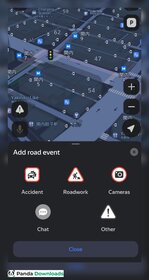
From the first trip, Yandex Navigator feels like an app designed by people who drive regularly. It gives up to three route options, warns about toll roads, and offers clear voice directions. You can report accidents, traffic jams, or roadworks without taking your hands off the wheel.
The app also helps before you even start driving. Business pages show opening hours, reviews, entrances, phone numbers, and parking information. That can save time when you're visiting a busy shopping center or restaurant.
One small feature says a lot about the app. In supported cities, traffic is shown on a 10-point scale, and a score of 10 means walking could actually be faster. It is a funny detail, but anyone who spends time behind the wheel will understand the joke. Another nice touch is the connection with Yandex Maps. Favorites, settings, and saved places are shared between both apps, so switching between them is easy.
Navigation That Works Well
The strongest part of Yandex Navigator is its traffic system, as it often finds a faster route before traffic becomes a serious problem. A common situation shows why this matters. If you are driving to the airport during rush hour and the motorway suddenly turns red with traffic, instead of leaving you stuck in the queue, Yandex quickly suggests another route. As you get closer to the airport, the app also tells you exactly which lane to use, making the final part of the drive much less stressful.
Offline maps are another useful feature. Download the map before your trip and the app will still search for addresses and calculate routes without an internet connection. Live traffic, cameras, and road events disappear until you're back online, but offline mode still works well in tunnels, underground parking, or rural areas with poor coverage.
Information on the Screen
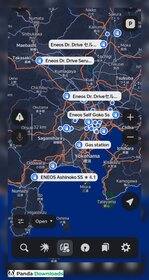
The interface shows more information than Google Maps. Speed limits, lane guidance, traffic colors, speed cameras, route changes, and turn instructions can all appear at the same time.
At first, the screen may look a little busy. After a few drives, everything becomes easier to read. Drivers who like detailed information will probably enjoy the layout. Those who prefer a cleaner design may need a little time to get used to it.
Almost every alert can be customized. You can change voice guidance, camera warnings, speed alerts, auto zoom, toll road settings, and more. Spending a few minutes in the settings before your first trip is worth it.
Performance Depends on Where You Drive
Yandex Navigator performs best in countries where Yandex has strong local map data. Many users in Armenia, Turkey, and nearby regions say it gives better routes than Google Maps, especially during heavy traffic.
The app is not perfect, though. Some recent users have reported crashes, GPS problems, and search issues after updates. Yandex also recommends turning on Wi-Fi and Bluetooth if your location is not accurate.
The developers continue to improve the app. Recent updates added step-by-step navigation for weak GPS conditions, train platform information in some areas, and live traffic light data in St. Petersburg. These are practical improvements that make daily use better.
Privacy Issues
Privacy is one area where Yandex Navigator raises more questions. The company says it encrypts your data and allows users to request deletion. At the same time, its privacy policy covers location, device details, account information, and activity data for its services.
In 2025, security researchers also reported a privacy issue involving Yandex and Meta on Android devices. Both companies later said the practice had stopped. Even so, people who care a lot about privacy may want to read the policy before using the app.
Helpful Tips
Download offline maps for the whole region before a long drive, not only for your destination.
Adjust voice guidance and camera alerts early. The default settings can be louder and more frequent than many drivers prefer.
If your GPS is acting up, turning on Wi-Fi and Bluetooth usually helps the app pin down your location more accurately.
Final Verdict
Yandex Navigator is a top-tier choice if you’re driving in areas where Yandex has solid map data. The traffic info is quick, the lane guidance is spot on, and those offline maps are a lifesaver when you lose your signal in a tunnel or out in the sticks.
The interface can feel busy at first, and privacy may be a concern for some users, but the driving experience is strong.
For many people, the best solution is to keep both Yandex Navigator and Google Maps installed. Yandex handles driving extremely well in its strongest regions, while Google Maps remains the better choice for worldwide coverage.
Screenshots

Related software
-
Download
 111
111

Comments
Please add a comment explaining the reasoning behind your vote.